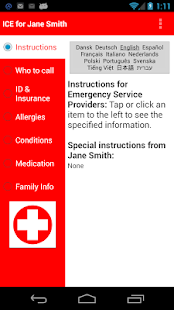
ICE: In Case of Emergency
For Android 4.2 & up, you can add the ICE widget to the system lock screen.
For earlier versions of Android, ICE provides its own lock screen mode.
The ICE lock screen also includes an optional "if found" message in case you lose your phone.
Install our companion app “Family Medical Info” to store medical info for the entire family, including vaccinations and medical history.
Optionally share some or all family info with ICE.
When info is shared with ICE, an additional “Family Info” category is added following Medications that will allow you or emergency service providers to access the shared info.
*** NEW: optionally use the (FREE) web version of Family Medical Info (FMI) to create & edit profiles on your computer.
From Google Chrome on your computer, go to http://goo.gl/N80BQ to install the web app (currently, this only works with the Chrome browser).
Or, just search for Appventive in the Chrome Web Store.
Profiles created with the web version of FMI can be imported into either FMI or ICE.
***
Optionally choose to email selected information (e.g., to your doctor).
Dynamically switch between Danish, Dutch, English, French, German, Greek (Android 2.3+), Hebrew (Android 4.2+), Italian, Japanese, Polish, Spanish, Swedish and Vietnamese when travelling.
If you would like to help translate ICE into a different language, please email us.
Optionally export the ICE user profile for use on other devices, or to save an off-device backup.
The exported profile can also be used by Family Medical Info.
If you have any questions, suggestions, or problems, PLEASE email us.
About ICE: In Case of Emergency
- Package name (App ID)
- com.appventive.ice
- Available on
- Google Play
- Price
- Free
- Version
- v2.2.4
- Developer
- Medical Joyworks
Looking for the ICE: In Case of Emergency APK?
The safest way to get ICE: In Case of Emergency (com.appventive.ice) on your Android device is to install it directly from Google Play — you'll always get the latest official version, automatic updates, and no risk of modified or infected APK files from third-party sites.
Social Features
Connect and share with friends and the community.
Travel Features
Plan and manage your travels with ease.
Food & Dining
Discover recipes and order food from your favorite restaurants.
See ICE: In Case of Emergency in Action


Frequently Asked Questions
Is ICE: In Case of Emergency free?
Yes, ICE: In Case of Emergency is free to download and install on Android through Google Play.
How do I install ICE: In Case of Emergency on Android?
Open Google Play on your Android phone or tablet, search for ICE: In Case of Emergency by Medical Joyworks or tap the Google Play button on this page, then tap Install. The app downloads and installs automatically.
What is com.appventive.ice?
com.appventive.ice is the App ID (package name) of ICE: In Case of Emergency on Google Play. Every Android app has a unique package name, and it is the safest way to verify you are installing the official app.
Is ICE: In Case of Emergency safe to download?
Installing ICE: In Case of Emergency from Google Play is the safest option: you get the official version published by Medical Joyworks, verified by Google Play Protect, with automatic updates. Avoid APK files from unofficial third-party sites.

Get ICE: In Case of Emergency Today
ICE: In Case of Emergency for Android — free download on Google Play.
Compatible with Android phones and tablets — available on Google Play.
Ask AI about this app
Get instant answers about features, tips and more from popular AI assistants.